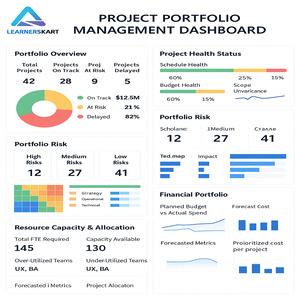
Project Portfolio Management Dashboard: Turning Data into Strategic Decisions
-
December 9, 2025
In today’s competitive and fast-changing business environment, organizations are under constant pressure to deliver projects faster, cheaper, and with higher value. However, when multiple projects run simultaneously—each with its own deadlines, risks, budgets, and resource needs—managing them effectively becomes a real challenge.
This is where a Project Portfolio Management (PPM) Dashboard becomes an essential strategic tool.
A well-designed PPM dashboard transforms scattered project data into clear, visual insights—helping leaders move from information overload to intelligent decision-making.
What Is a Project Portfolio Management Dashboard?
A PPM Dashboard is a centralized visual platform that gives real-time visibility into all projects within an organization’s portfolio.
Instead of relying on lengthy reports or inconsistent spreadsheets, decision-makers can monitor key metrics, track progress, and identify risks—all from one place.
A PPM dashboard typically provides insights into:
-
Project status (On Track, At Risk, Delayed)
-
Budget and financial health
-
Resource capacity and utilization
-
Portfolio risks and dependencies
-
Strategic alignment
-
Milestones and delivery timelines
In simple terms, it serves as the single source of truth for executives, PMOs, and project teams.
Why a PPM Dashboard Matters for Organizations
1. Real-Time Visibility Across All Projects
A PPM dashboard gives leaders an instant, accurate snapshot of what’s happening across the entire portfolio. This real-time visibility supports proactive decision-making instead of reactive firefighting.
2. Improved Decision-Making
With clear visual data—charts, KPIs, heatmaps, and status reports—leaders can make informed choices about timelines, budgets, and priorities.
3. Optimized Resource Allocation
PPM dashboards highlight team workload, skill shortages, and over-utilized departments, making it easier to distribute resources effectively.
4. Early Risk Identification
Risks across multiple projects are mapped and monitored, enabling teams to mitigate issues before they escalate.
5. Alignment with Business Strategy
Dashboards show how each project contributes to organizational goals, ensuring investments are directed toward high-value initiatives.
6. Transparent Communication
Stakeholders get concise, visual updates without the need for lengthy meetings or manual reports.
Key Features of an Effective PPM Dashboard
A powerful project portfolio dashboard should include:
✔ Portfolio Overview
-
Total projects
-
Status distribution (On Track, At Risk, Delayed)
-
Major milestones
-
KPIs at portfolio level
✔ Project Health Indicators
-
Schedule variance
-
Budget status
-
Scope changes
-
Quality metrics
✔ Financial Insights
-
Planned vs actual cost
-
Cost forecasts
-
ROI projections
-
Benefit realization
✔ Risk Heatmap
Visual risk indicators showing probability and impact across the portfolio.
✔ Resource Capacity & Allocation
-
Team utilization
-
Skill availability
-
Under/over usage alerts
✔ Strategic Alignment Score
Measuring how well each project supports organizational objectives.
How a PPM Dashboard Supports Strategic Decision-Making
A PPM dashboard does more than track progress—it drives smarter business decisions by:
1. Prioritizing the Right Projects
It helps identify which projects deliver the highest value, ensuring time and budget are invested wisely.
2. Improving Forecast Accuracy
With real-time financial and performance insights, leaders can forecast outcomes more precisely.
3. Increasing Delivery Speed
Early detection of issues and resource bottlenecks helps teams act quickly and keep timelines on track.
4. Strengthening Portfolio Governance
Standardized reporting ensures consistency and accountability across all teams.
5. Maximizing Business Value
Every project is evaluated for ROI, strategic alignment, and expected impact on business goals.
Who Needs a PPM Dashboard?
A Project Portfolio Management Dashboard is valuable for:
-
Project Management Offices (PMOs)
-
Senior Management & Executives
-
Program Managers
-
Project Managers
-
Business Analysts
-
Finance & Strategy Teams
Any organization handling multiple projects will benefit from a centralized, data-driven decision system.
Popular Tools Used to Create PPM Dashboards
Many organizations rely on tools like:
-
Power BI
-
Tableau
-
Microsoft Project Online
-
Jira Portfolio / Advanced Roadmaps
-
Monday.com
-
Smartsheet
-
ClickUp Portfolio
-
Asana Portfolios
These platforms help integrate data, automate reporting, and create customizable dashboard views.
Conclusion
A Project Portfolio Management Dashboard is not just a reporting tool—it is a strategic powerhouse that empowers leaders to turn data into action.
With enhanced visibility, better forecasting, improved resource allocation, and clear alignment to business goals, a PPM dashboard helps organizations deliver consistent value and stay ahead of the competition.
If you’re looking to enhance your project management skills or earn globally recognized certifications like PMP®, CAPM®, PMI-ACP®, Prince2®, or Lean Six Sigma—Learnerskart is here to support your career growth.
Contact Learnerskart
🌐 Visit: www.learnerskart.com | 📧 Email: info@learnerskart.com
✔️ Follow us for more project management tips & career insights! https://lnkd.in/gYB4Dw4K
Tags:
LearnersKart Project ManagementPMO DashboardPortfolio Management ToolsPortfolio Performance TrackingPortfolio Risk DashboardPPM DashboardPPM ToolsProject Dashboard ExamplesProject Governance DashboardProject Management InsightsProject Management MetricsProject Portfolio Management DashboardProject Portfolio ReportingResource Allocation DashboardStrategic Decision Making
You May Also Like

-
Feb 16, 2026
If you’re planning to apply for the PMP certification in 2026, one important question comes first: “Am I really eligible...
-
Feb 13, 2026
In today’s fast-paced business environment, choosing the right project delivery approach can determine whether your project succeeds or struggles. Organisations...
-
Feb 10, 2026
In today’s fast-paced and increasingly complex business environment, organisations are no longer managing just one or two initiatives at a...
-
Feb 9, 2026
In project management, confusion over who does what and who makes the final decision is one of the biggest reasons...
Sign up to receive our latest updates
Company
Support
Service Offerings
Special Offers
Get in touch
India
Call us directly?
+91-984-459-1589
Address
Learnerskart Solutions Pvt Ltd
4th floor, No: 207/189, 9th Main Rd, 6th Sector,
HSR Layout, Bengaluru, Karnataka 560102
info@learnerskart.com
USA
Call us directly?
+1 (307)-998-3816
Address
Learnerskart Americas LLC
30 N Gould St Ste R
Sheridan, WY 82801
info@learnerskart.com
Quick Contact
Trending Categories
Disclaimer
“PMI®”, “PMBOK®”, “PMP®”, “CAPM®” and “PMI-ACP®” are registered marks of the Project Management Institute, Inc.
ITIL® and PRINCE2® are registered trade marks of AXELOS Limited, used under permission of AXELOS Limited. All rights reserved.
“CSM”, “CST” are Registered Trade Marks of The Scrum Alliance, USA.
