When most people think of project management tools, they imagine platforms like Trello, Asana, or Microsoft Project. However, did you know that you can build a highly effective project management system using the tools you already have access to in Google Workspace?
Let’s explore how smart teams use familiar Google tools to streamline their projects: Free Project Management Tools
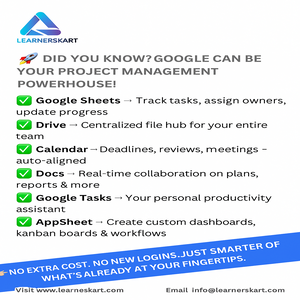
📌 1. Google Sheets – Your Task Tracker
Use Sheets to create task lists, assign responsibilities, and monitor progress. With conditional formatting, filters, and formulas, Sheets can be transformed into a powerful task board or even a basic Gantt chart.
📂 2. Google Drive – Centralized Document Storage
All project files—documents, presentations, spreadsheets—can be stored and shared securely through Drive. You control permissions and ensure team members always access the latest version.
📅 3. Google Calendar – Aligning Timelines and Meetings
Use Calendar to set project milestones, deadlines, and recurring team syncs. You can share calendars or invite team members to key events with ease.
📝 4. Google Docs – Real-Time Collaboration
Google Docs lets your team work on the same document simultaneously. Whether it’s a project plan, meeting notes, or report, everyone can contribute and comment in real time.
📊 5. AppSheet – Custom Dashboards and Automation
Want to go a step further? AppSheet (a no-code app builder by Google) helps you create custom dashboards, Kanban boards, approval workflows, and more—all integrated with your existing Sheets data.
✅ 6. Google Tasks – Personal To-Do Management
For individual team members, Google Tasks is an excellent tool for tracking personal action items that align with overall project goals.
💡 Bonus Tools via Add-ons
Google Workspace allows seamless integration with third-party tools like:
-
Ganttter – For building Gantt charts inside Google Drive
-
Kanbanchi – A Kanban-style project management tool built for Google Workspace
-
Asana – Add tasks to Asana directly from Gmail
Why Buy New Tools When You Already Have What You Need?
With the right setup, your existing Google tools can handle most of your project management needs—saving you time, money, and training effort.
At LearnersKart, we empower professionals and teams to master project management using the tools they already know—whether it’s Google Workspace, Microsoft 365, or industry-specific platforms.
👉 Visit: www.learnerskart.com
📩 Email: info@learnerskart.com
Tags: #ProjectManagement #GoogleWorkspace #ProductivityTips #ProjectTools #LearnersKart
Tags:
You May Also Like
-
Aug 28, 2025
When professionals think of project management tools, names like Jira, Trello, Asana, or Wrike usually come up. However, there’s a...
-
Aug 18, 2025
AI & Automation in Project Management – The Future is Now! The project management landscape is undergoing a massive transformation....

-
Aug 8, 2025
The Hidden Challenge: What to Do When a Critical Project Resource Leaves? Every successful project relies on key contributors—those professionals...
-
Aug 6, 2025
Understanding Project Roles Through the Lens of Family Dynamics Managing a project often feels like managing a family. Every role,...
Sign up to receive our latest updates
Company
Support
Service Offerings
Special Offers
Get in touch
India
Call us directly?
+91-984-459-1589
Address
Learnerskart Solutions Pvt Ltd
4th floor, No: 207/189, 9th Main Rd, 6th Sector,
HSR Layout, Bengaluru, Karnataka 560102
info@learnerskart.com
USA
Call us directly?
+1 (307)-998-3816
Address
Learnerskart Americas LLC
30 N Gould St Ste R
Sheridan, WY 82801
info@learnerskart.com
Quick Contact
Trending Categories
Disclaimer
“PMI®”, “PMBOK®”, “PMP®”, “CAPM®” and “PMI-ACP®” are registered marks of the Project Management Institute, Inc.
ITIL® and PRINCE2® are registered trade marks of AXELOS Limited, used under permission of AXELOS Limited. All rights reserved.
“CSM”, “CST” are Registered Trade Marks of The Scrum Alliance, USA.
